Summary
Modern web development is being transformed by AI-assisted coding tools. Here's a real-world case study of how we built a full-featured enterprise training platform in a fraction of the traditional time and cost.
When a client needed a custom training portal mid-project, Steel Croissant got resourceful, leading us to deliver it using AI-assisted development—saving time, budget, and keeping the overall project on track.
The Challenge: An Unexpected Requirement
The client initially came to Steel Croissant for a comprehensive website redesign. Midway through the project, they identified a critical need: a full-featured Training Portal for their growing team. Rather than delay the website launch or balloon the budget, Steel Croissant brought in Homade to build the portal using AI-assisted development with Replit while their design and development team continued work on the main website in parallel.
Phase 1: The Training Portal
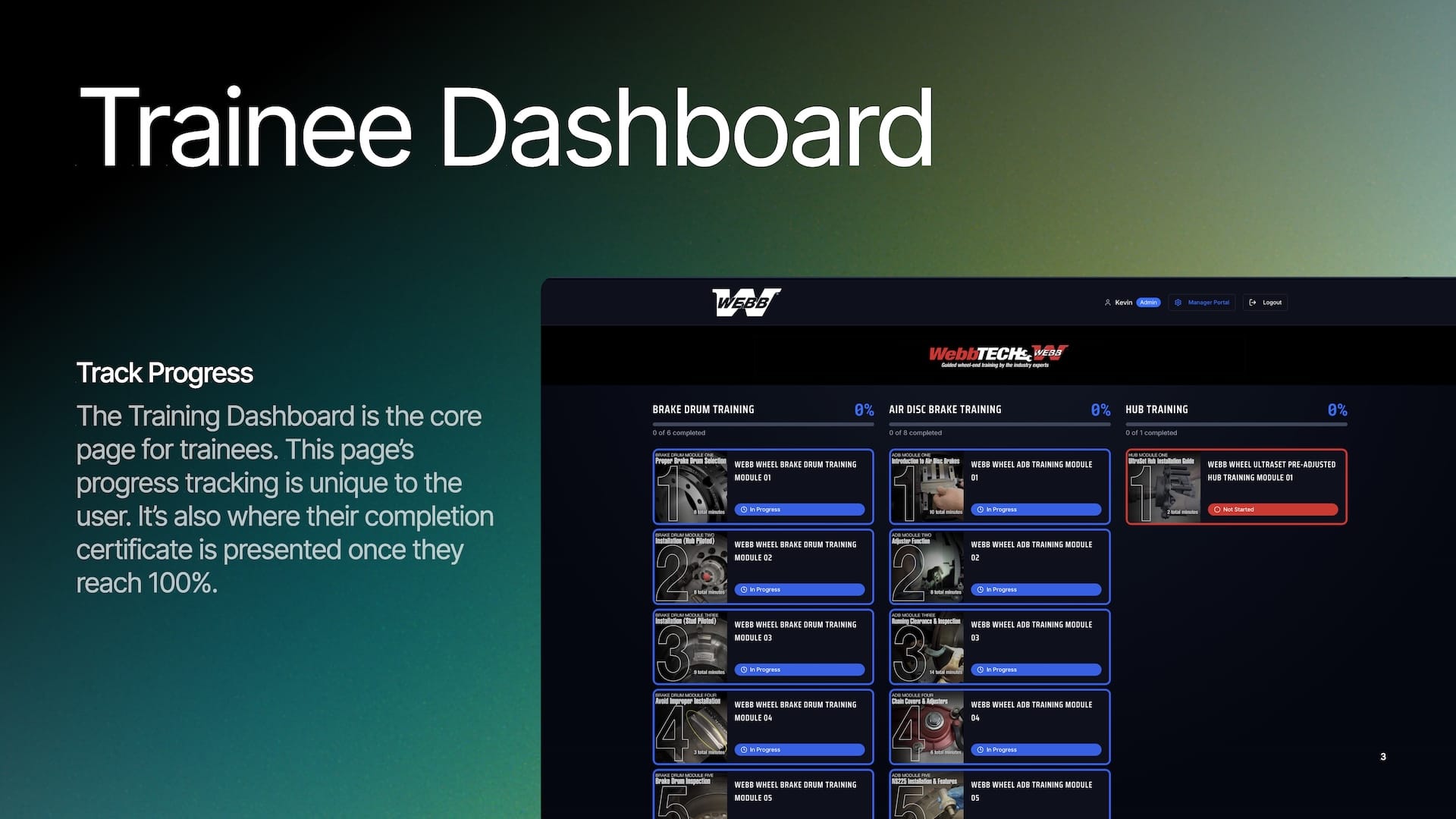
The Training Portal is a comprehensive learning management system featuring:
- Multi-tier authentication with four role levels (super-admin, admin, manager, trainee) supporting both password and OAuth login
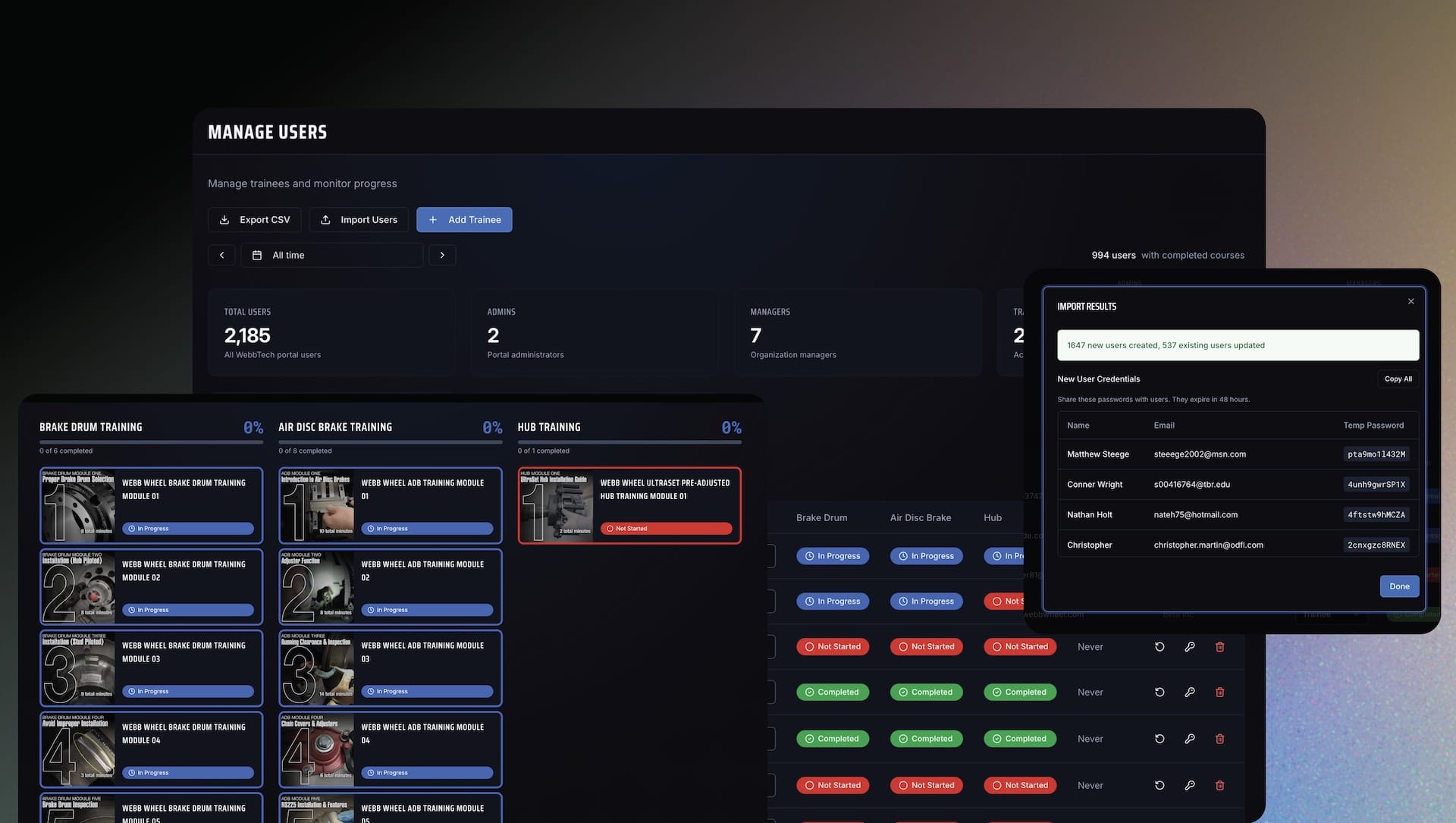
- Bulk user management capable of importing 2,000+ users at once with organization scoping
- Dynamic training modules with flexible 1–10 step structures and video streaming
- Interactive quizzes with multiple question types and automated grading
- Automated certificate generation using canvas-based PDF creation
- Content management system with draft/published workflows and export/import capabilities
- Progress tracking with date-filtered completion metrics
- Server-persisted video progress tracking that prevents users from skipping content by requiring high watch-time completion before unlocking quizzes, with 30-second heartbeat updates and resume-from-last-position functionality
- Cost and usage dashboard for super-admins to track hosting expenses (compute, database, object storage, bandwidth) with historical logging, billing recommendations, and profit margin calculations—enabling transparent client billing
Video Verification That Just Works
As usage grew, real-world behavior surfaced a subtle but important issue: trainees sometimes saw "100% complete" locally while the server recorded slightly less, which could block quiz unlocks.
We evolved the video verification system to make completion both stricter and more reliable:
- 100% video completion now required (previously 85–90%) before quizzes unlock
- Synchronous server confirmation when the video ends, to ensure server and client stay perfectly in sync
- A more robust flow that ensures reliable quiz unlock every time, even under less-than-ideal network conditions
The result is a training experience that feels fair to trainees, while giving administrators confidence that required content has actually been watched.
Phase 2: Product Operations App
After launch, the client needed more than just a Training Portal. They also needed a way to manage a growing product catalog and keep multiple systems in sync without adding headcount or slowing down operations.
Homade extended the platform with a dedicated Product Operations app that sits alongside the Training Portal.
Key Features
- Product Catalog Manager
Full CRUD for 8+ product databases, managed in one place and synced to Webflow via Xano. Admins can add, edit, archive, and relate product records without touching code.
- Staged Changes Workflow
All edits now flow through a "staged" layer before going live. Editors can:
- Batch changes into review sets
- Compare staged vs. live values
- Approve or reject edits before publishing to production
- Real-Time Change Detection
Background polling continuously checks for external changes in connected systems. When something changes outside the app (for example, in Webflow or an external database), admins are notified and can reconcile differences with a few clicks.
- Server-Side Data Validation
Zod schemas enforce strict server-side validation on all incoming data. This protects against malformed inputs, inconsistent field types, and breaking changes when new attributes are introduced.
- Backup & Restore System
Every change is backed by a 90-day retention window with one-click restore. Super-admins can:
- Roll back a single record
- Restore a full table to a previous snapshot
- Recover from bad imports or accidental edits without engineering support
- Cost Monitoring Dashboard
A dedicated dashboard exposes usage and cost metrics for super-admins, including:
- Compute, database, storage, and bandwidth usage
- Historical cost trends
- Profit margin estimates per environment or client
Interchange Table Support: Bringing 15,000+ Records Under Control
One of the biggest additions to the Product Operations app is full support for a Public Interchange Table containing over 15,000 records.
This table is now:
- Fully integrated into the app, not a separate, manual process
- Managed with full CRUD operations (create, read, update, delete)
- Displayed in the UI as "Interchange" with clear, human-readable columns:
- Company
- Interchange
- (part numbers)
- Notes_Comments
Instead of wrestling with a massive spreadsheet or disconnected system, admins can now search, edit, and relate interchange data directly alongside the rest of the product catalog.
Cache-First Architecture for Large Tables
Supporting a public table with 15,000+ rows introduced new performance challenges. To keep the experience fast and reliable, we introduced a cache-first architecture for large tables:
- Instant response: Cached data is served immediately, whether it is fresh or slightly stale
- Background refresh: When cached data is stale, the app kicks off a background refresh without blocking the UI
- Smart large-table detection: Known large tables (15,000+ records) skip heavy synchronous fetches entirely and rely on the cache-first flow
- 90-second timeout for background refresh jobs to prevent long-running processes from hanging
- A "Refresh from Xano" button gives admins a one-click way to pull the latest data from the external API on demand
Admins get the speed of a local app with the accuracy of live data, without needing to understand any of the underlying plumbing.
Large Table UX: Designed for Clarity, Not Confusion
Large datasets can easily feel opaque or brittle. To counter that, the UI now includes:
- A "Loading Large Table" state with clear messaging while big datasets are being prepared
- A "Failed to Load Table" message with a friendly explanation and a visible Retry button when something goes wrong
- A "Check if ready" polling action so users can see when a background job has finished preparing data, instead of guessing or refreshing the page
Together, these patterns turn complex backend behavior into a simple, understandable experience for everyday users.
Server-Side Pagination and Smarter API Usage
Originally, large tables required fetching entire datasets at once. That does not scale.
The app now uses server-side pagination for big tables:
- 100 records per page instead of pulling the full table
- A 5-minute cache TTL to dramatically reduce repeated API calls
- Accurate total record counts surfaced in the UI (for example, "15,342 records") so admins understand the size of the data they are working with
This keeps the interface responsive while staying considerate of upstream API and infrastructure limits.
Dynamic Table Discovery
As the client’s data model grows, new tables and structures will appear over time. Instead of requiring code changes for each one, the app now:
- Auto-detects tables directly from the Xano API instead of relying on a hardcoded list
- Surfaces newly discovered tables with a green "New" badge so admins can spot them at a glance
- Uses a probe system that periodically checks for additional tables that might be added later—no deploys required
The result is a product catalog that evolves alongside the underlying data, not one that constantly lags behind it.
Human-Friendly Display Names
Backend table names are often written in snake_case, which is great for databases but not ideal for everyday users.
To keep things readable:
- Table names are automatically converted from snake_case to Title Case (for example,
hub_drum_data→ "Hub Drum Data") - Specific tables can define custom display names, such as mapping
public_interchange_tableto simply "Interchange" in the UI
This small detail adds up when admins are working across many different tables and need to stay oriented.
The Numbers Tell the Story
Working solo with AI assistance, one Homade developer delivered dramatic time and cost savings across both phases of the project.
Technical Footprint
From Phase 1 to Phase 2, the application expanded significantly while remaining maintainable by a single developer. The codebase now includes:
- Tens of thousands of lines of application code, up from an already substantial 21,866-line base
- 70+ API endpoints, including new Xano integration endpoints and large-table handling workflows
- 11 core database tables in the primary application, with additional tables managed externally in Xano
This footprint covers the Training Portal, Product Operations app, Interchange Table integration, Webflow and Xano integrations, and supporting infrastructure.
Time and Cost Savings
By combining AI-assisted development with a focused solo-developer model, the client realized even greater efficiency gains as the platform grew.
Estimated time savings
- Traditional development for an equivalent scope: 350–450 hours
- With AI-assisted development and ongoing enhancements: 350–400+ hours saved across training, product operations, and large-table work
Estimated cost savings
- Typical agency quote for this breadth of functionality: $55,000–$70,000+
- Actual build cost: $8,000–$10,000 in development time + modest platform spend
- Total estimated savings: $45,000–$60,000+ compared to traditional approaches
What would typically require a multi-sprint team effort over 6–8 weeks was compressed into roughly 2–3 weeks of focused solo work for the initial Training Portal, followed by targeted phases for the Product Operations app, Interchange integration, and large-table improvements—all while the primary website project progressed on schedule.
Real-World Challenges Solved (Phase 1)
1. Bulk Import Performance Crisis
When importing 2,186 trainees and team members, the system initially crashed with 504 timeouts due to over 10,000 individual database queries. We solved this by pre-fetching data in bulk, processing in 50-user batches, and using in-memory Maps for O(1) lookups. Result: imports that complete in seconds instead of timing out.
2. Duplicate Email Handling
Legacy data contained duplicate emails that caused import failures. We implemented graceful upsert logic that updates existing users, continues processing, and collects errors without halting—achieving 100% import success for valid records.
3. Video Streaming at Scale
Training videos over 30MB were failing to load. We added HTTP Range request support, lazy loading, and click-to-play interfaces to enable smooth video playback with full seek support.
4. Manager Access Scoping
Managers were initially seeing all users across the system. We implemented middleware-enforced organization filtering at the API level to achieve true multi-tenant isolation.
Architecture Decisions That Mattered
Several key technical choices enabled the platform's flexibility and performance:
- JSONB for module steps provided flexibility for 1–10 steps without schema changes
- Dual authentication modes balanced production security with development convenience
- Client-side PDF generation eliminated server load for certificate creation
- PostgreSQL sessions survived server restarts and enabled session inspection
- Drizzle ORM delivered type-safe queries with zero runtime overhead
- AI-assisted code generation accelerated boilerplate while keeping architecture decisions firmly in human hands
Enterprise-Grade Security
Security was built into every layer:
- Bcrypt password hashing with cost factor 10
- Email domain restrictions in production
- Forced password reset on first login
- Role-based API middleware
- Organization-scoped data access
- Session-based authentication with secure cookies
- Super-admin bypass for emergency access
- Server-side validation with Zod to prevent bad data from ever reaching the database
Business Impact for the Client
The transformation from manual processes to automation delivered immediate value across both training and product operations.
Before vs. After (Training)
- Manual Excel tracking → Automated progress dashboard
- Paper certificates → Instant PDF generation
- No access control → 4-tier role hierarchy
- Single admin → Delegated manager access
- Manual user creation → Bulk import 2,000+ users
- No content versioning → Draft/published workflow
- Fragile video completion logic → Stricter, server-confirmed verification that reliably unlocks quizzes
Before vs. After (Product Operations)
- Ad hoc product updates in scattered systems → Centralized product catalog manager
- Risky, direct edits in production → Staged changes with review and approval
- No true visibility into data changes → Real-time change detection and alerts
- Manual backups and rollback via CSVs → 90-day backup and one-click restore
- Unclear hosting costs → Cost monitoring dashboard with clear margins
- Limited visibility into massive reference data → Interchange Table with 15,000+ records fully integrated, paginated, and searchable
The ongoing operational savings are substantial:
- Manual user onboarding: 40 hours/month → 1 hour
- Certificate costs: $5/certificate → $0
- Training tracking: 20 hours/month → automated
- Product catalog edits and synchronization: hours of manual work per week → minutes inside a single app
- Interchange maintenance and lookup: manual spreadsheet wrangling → structured, in-app workflows
The Solo Developer Advantage
By having one experienced developer work independently with AI assistance, we achieved:
Speed
No coordination overhead, instant decision-making, continuous progress.
Consistency
Single architectural vision throughout the codebase, from the Training Portal to product operations to large-table handling.
Cost efficiency
One developer rate instead of a team, even as the app footprint grew to tens of thousands of lines of code, 70+ endpoints, and 11 core tables.
Parallel workstreams
Website and portal development never conflicted, and Phase 2 and large-table improvements landed without disrupting production.
While Steel Croissant's team focused on perfecting the main website—Homade quietly delivered and then expanded an entire enterprise application as a value-add for the client.
Platform Costs
Beyond the development savings, the platform economics are equally compelling.
Development Phase
- AI agent usage: $100–250 (bulk of credits as the scope expanded)
- Compute resources: Included in base plan
- Database: Free or low-tier paid plan sufficient
- Object storage: $10–40 for initial usage
Total one-time development cost: ~$400–700 in AI agent credits and platform spend
Ongoing Monthly Hosting
- Compute: App hosting on Replit
- Database: Neon PostgreSQL
- Object storage: Video file storage
- Bandwidth: Video streaming egress
Estimated ongoing cost: $30–50/month
Client billing model: $50–75/month with built-in cost tracking
The platform includes a super-admin cost dashboard that tracks actual hosting expenses and calculates profit margins in real time—enabling transparent billing and ensuring the portal remains profitable while delivering massive value compared to traditional LMS solutions that often cost $200–500/month for comparable feature sets.
Key Takeaways
This project demonstrates several important lessons about modern agency partnerships:
- Flexibility creates value. When unexpected needs arise mid-project, AI-assisted development enables agencies to adapt without derailing timelines or budgets.
- Solo does not mean limited. One skilled developer with AI assistance can deliver enterprise-grade applications that would traditionally require a full team—and then extend them with additional capabilities like product operations, cost monitoring, and large-table handling.
- Parallel development multiplies output. By separating concerns—website, Training Portal, product operations, and data infrastructure—each workstream progressed without bottlenecks or dependencies.
- The economics are transformative. What once required a $40,000–$50,000+ budget expansion is now achievable for ~ $6,000 in build cost plus low ongoing hosting—making "yes, and..." responses possible instead of "that will require a change order."
The Future of Agency Development
At Steel Croissant, we believe AI-assisted development is not replacing developers—it is amplifying what skilled developers can accomplish. By handling boilerplate code, common patterns, and routine implementation details, AI tools free developers to focus on architecture, problem-solving, and user experience.
Contact Us to see how we can leverage the latest technologies to solve the latest problems in your organization.


